
I have been doing SEO for more than 10 years. During this time, one question never changes.
“How many real leads am I actually getting from Google search?”
Not traffic or impressions or rankings. Leads.
Moreover, most businesses still guess. They rely on assumptions. Therefore, they overestimate SEO or sometimes undervalue it completely.
In this guide, I will show you exactly how to track leads from Google Search. No fluff. No theory. Only what works in the real world.
I will also share real case studies from client projects. As well as common mistakes I see every month.
Let’s start.
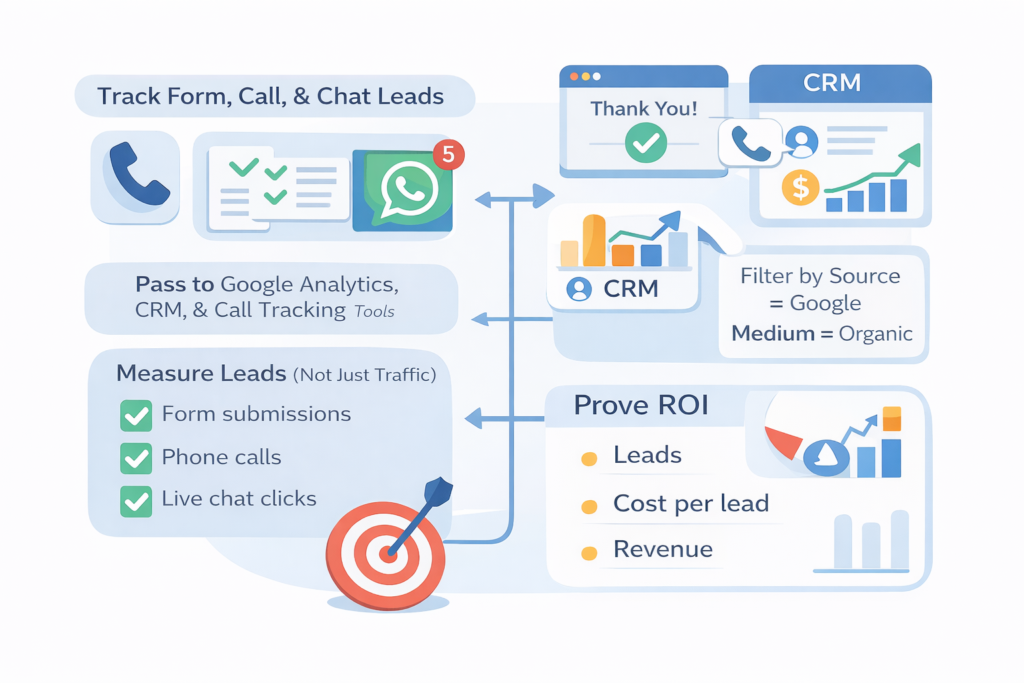
Why Is Tracking Leads From Google Search So Important?
Traffic feels good. However, traffic does not pay salaries. Leads do.
Moreover, Google Search traffic often mixes with other channels.
Therefore, without tracking, you never know what actually works.
Also, when you track leads properly, you:
- justify SEO budgets
- identify high-converting keywords
- scale what brings revenue
In short, tracking equals control.
What Exactly Counts as a Lead From Google Search?
This sounds obvious.
However, many businesses get this wrong.
A lead from Google Search is any action that starts from an organic Google visit and shows buying intent.
Usually, this includes:
- Contact form submissions
- Phone calls
- WhatsApp clicks
- Live chat conversations
- Demo or quote requests
- Email clicks
Moreover, a lead is not a page view, a scroll or a time-on-page metric.
Therefore, define leads clearly before tracking anything.
Can Google Analytics Alone Track SEO Leads Accurately?
Short answer: No.
Google Analytics is necessary. However, it is not sufficient by itself. Moreover, GA only tracks what you tell it to track. Therefore, if your setup is wrong, your data is wrong.
In real audits, I see forms not tracked, calls ignored, thank-you pages missing and also, events firing incorrectly. As a result, businesses think SEO “isn’t converting.”
In reality, they just can’t see conversions.
How Do I Track Form Leads From Google Search Properly?
This is the foundation.
Step 1: Create a Thank-You Page
Never use a popup confirmation only.
Always redirect users to a unique thank-you URL.
For example:/thank-you/seo-consultation/
Moreover, each form should have its own thank-you page.
Step 2: Set a Conversion in Google Analytics
Mark that thank-you page as a conversion.
In GA4:
- Go to Events
- Create an event for page_view + thank-you URL
- Mark it as a conversion
Therefore, every form submission becomes measurable.
Step 3: Filter by Organic Traffic
Now view conversions where:
Source = google
Medium = organic
Then that number equals real SEO leads.
Case Study: B2B SaaS Company (India)
Before tracking:
- They believed SEO brought “brand awareness only”
After proper setup:
- 47 organic form leads per month
- 11 converted into paid demos
Moreover, SEO became their #1 channel within 3 months.
How Can I Track Phone Call Leads From Google Search?
Phone calls are often the biggest blind spot.
Especially for local businesses, service providers and high-ticket sales.
Option 1: Google Call Tracking Numbers
Use a dynamic call tracking tool.
Examples:
- CallRail
- WhatConverts
- Twilio-based setups
These tools:
- Show the traffic source
- Record calls
- Attribute calls to Google organic
Moreover, they integrate directly with Google Analytics.
Option 2: Google Business Profile Insights
You can track calls from search, calls from maps as well as direction requests.
However, GBP data is directional, not exact.
Therefore, use it alongside call tracking software.
Case Study: Local Dental Clinic
Before call tracking:
- SEO ROI unclear
After implementation:
- 63 organic calls per month
- 38 booked appointments
- Average ticket size ₹12,000
As a result, SEO budget doubled.
How Do I Track WhatsApp and Chat Leads From Google Search?
WhatsApp and live chat are everywhere now. However, most businesses do not track them.
Step 1: Track Click Events
Track clicks on:
- WhatsApp buttons
- Chat widgets
- Messenger links
Use Google Tag Manager for this.
Step 2: Mark Events as Conversions
Once tracked, mark those events as conversions in GA4.
Step 3: Segment Organic Traffic
Again, filter by google / organic.
Therefore, every WhatsApp click from SEO becomes visible.
Case Study: Home Services Company
They relied heavily on WhatsApp.
Before tracking:
- Zero SEO conversions reported
After setup:
- 92 WhatsApp leads/month from organic search
- 31% conversion to booked jobs
Moreover, SEO outperformed paid ads.
How Can Google Search Console Help With Lead Tracking?
Google Search Console does not track leads directly.
However, it is extremely powerful.
You can:
- Identify high-intent keywords
- Match queries to converting pages
- Improve pages that already generate leads
For example:
- Query: “emergency plumber near me”
- Page: Contact page
- Leads: High
Therefore, optimize what already converts.
How Do I Connect Keywords to Actual Leads?
This is advanced SEO tracking.
Step 1: Identify Top Landing Pages
Use GA to find pages with organic conversions.
Step 2: Check Their Queries in Search Console
See which keywords drive traffic to those pages.
Step 3: Prioritize Commercial Queries
Focus on:
- “near me”
- “pricing”
- “services”
- “cost”
- “best”
As a result, your SEO strategy becomes revenue-driven.
Case Study: Legal Services Website
Traffic pages: Blog posts
Lead pages: Service pages only
By shifting SEO focus:
- Traffic dropped 18%
- Leads increased 64%
Therefore, traffic volume is meaningless without intent.
How Can I Track SEO Leads in a CRM System?
Analytics is good but CRM is better.
Connect:
- Google Analytics
- Call tracking
- Forms
- CRM (HubSpot, Zoho, Salesforce)
Pass UTM parameters automatically.
Therefore, every lead shows:
- Source: Google
- Medium: Organic
- Keyword intent (indirectly)
This also helps sales teams trust SEO data.
How Do I Avoid Common SEO Lead Tracking Mistakes?
After auditing 200+ websites, I see the same issues.
Mistake 1: Tracking Only Traffic
Traffic is vanity. Leads are sanity.
Mistake 2: No Thank-You Pages
Without them, tracking breaks.
Mistake 3: Ignoring Phone Calls
Especially fatal for local SEO.
Mistake 4: Mixing Paid and Organic Data
Always separate Google Ads from organic search.
Mistake 5: No Regular Validation
Test conversions monthly. Things break silently.
How Accurate Can SEO Lead Tracking Really Be?
Nothing is 100% perfect, however, you can reach 90–95% accuracy.
With:
- Proper events
- Call tracking
- CRM integration
That level is more than enough for business decisions.
Moreover, it beats guessing.
How Long Does It Take to See Reliable SEO Lead Data?
Usually:
- 2–4 weeks for clean data
- 2–3 months for trends
- 6 months for confident ROI analysis
Therefore, be patient but consistent.
How Do I Prove SEO ROI to Stakeholders or Clients?
Show: number of leads, cost per lead, conversion to sales as well as revenue influenced.
Avoid: rankings screenshots and traffic graphs alone.
Decision-makers care about money, therefore, speak their language.
Final Thoughts: What Actually Matters in SEO Lead Tracking?
After 10 years in SEO, one thing is clear: If you cannot track leads then you are not doing SEO. You are just publishing content.
Track forms, calls as well as chats. Connect everything to revenue.
Therefore, SEO becomes predictable. Moreover, budgets become easier to defend. Also, growth becomes intentional.
That is how you track exactly how many leads you get from Google Search.

Leave a Reply