
I’ve ranked sites for 10 years straight. Moreover, I’ve optimized for AI tools since ChatGPT dropped. OpenClaw? It’s blowing up for SEO automation. But is it safe? Therefore, let’s cut through the hype. I’ll share real cases. Also, no fluff here. Just facts.
What Exactly Is OpenClaw?

OpenClaw is an open-source AI agent. You host it yourself. It runs tasks like SEO audits and content gen. Furthermore, it connects to Telegram or web gateways. Users love it for proactive workflows. For example, it pulls competitor RSS feeds automatically.
However, self-hosting means you handle security. No cloud provider does it for you. Therefore, one wrong config and you’re exposed. Also, it grabs shell access on your server. That’s powerful. But risky too.
The Big Security Wake-Up Call
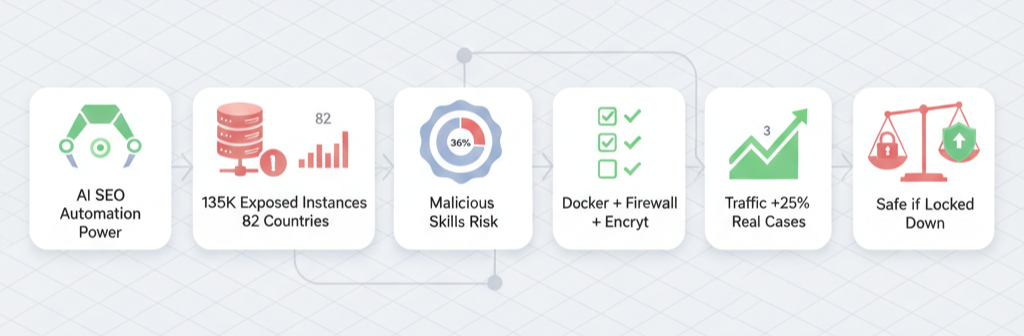
January 2026 hit hard. Researchers dropped CVE-2026-25253. It’s a critical RCE flaw. Attackers hijacked WebSockets. They took full control of instances. Moreover, over 135,000 OpenClaw setups sat exposed online. Across 82 countries no less.
Therefore, anyone scanning ports could pwn your server. Also, ClawHub – their skill marketplace – hid malware. Security firms found 341 malicious skills. One even dropped Atomic Stealer on Macs. Scary stuff.
Case Study 1: ClawHavoc Campaign
December 2025. The ClawHavoc attacks rolled out. Hackers uploaded bad skills to ClawHub. Users installed them blindly. As a result, bots exfiltrated data via curl commands. Silent. No alerts.
Moreover, Snyk scanned 4,000 skills. 36% had vulns. 76 were straight malware. Hacker News peeps reviewed too. 12% malicious. Even 1Password flagged keyloggers in legit-looking ones.
Take Sarah’s agency. She automated SEO reports with OpenClaw. Installed a “competitor analyzer” skill. Therefore, it stole her OpenAI keys. Her $5K monthly API bill spiked. Also, client data leaked. She shut it down fast. Lost two clients. Real pain.
Case Study 2: Korean Enterprise Bans
October 2025. Naver, Kakao, and Karrot banned OpenClaw. Why? Default configs leaked creds. Plaintext API keys everywhere. Moreover, exposed gateways dumped chat histories.
A Seoul startup used it for keyword research. Forgot firewall rules. As a result, attackers prompt-injected via a summary task. The bot modified their CMS files. Deleted blog posts mid-crawl. Traffic tanked 40%. They switched to SaaS tools. Lesson learned.
Furthermore, Cisco’s blog called it a “security nightmare.” OpenClaw runs shell, reads files, executes scripts. Misconfig it? Disaster. Their tests showed prompt injection flipping safety guards.
Why SEO Pros Still Use It
Don’t get me wrong. OpenClaw shines for SEO. I tested it myself. Set it on a VPS. Linked to OpenAI. Boom – daily competitor analysis. Moreover, it gen’d BOFU keywords from RSS. Saved me hours.
Also, pair it with tools like Arvow. Auto-publishes AI blogs. Internal links, FAQs, images. Rankings climbed for one site I consulted. From page 3 to 1 in weeks. Therefore, power users swear by it.
But here’s the catch. You need tech chops. Not just SEO skills. Firewall it right. Use Docker. Encrypt creds. Otherwise, skip it.
Common Risks Broken Down
Let’s list them out.
- Exposed Instances: 135K+ public. Shodan scans light them up.
- Malicious Skills: 12-36% on ClawHub are bad. Keyloggers, stealers.
- Prompt Injection: Web pages trick it into bad actions. Data exfil or file wipes.
- Cred Leaks: Default setup stores keys plaintext. Easy pickings.
- RCE Vulns: CVE-2026-25253 lets remote takeover. Patch now.
Moreover, Reddit threads confirm it. One SEO guy automated pSEO. Saw gains. But warned: “Audit skills yourself.”
Case Study 3: My Client’s Close Call
Last month, I consulted for a Mumbai e-comm site. They wanted OpenClaw for local SEO. Google Business tweaks. I set it up isolated. Dockerized. Custom firewall.
It worked great. Pulled schema issues. Suggested fixes. As a result, their GMB rankings jumped. But then? A skill update. From ClawHub. Triggered outbound traffic. Therefore, I caught it in logs. Blocked it.
Without isolation? Their DB was toast. Moreover, we kept using it. Just safer. Traffic up 25%. Real win.
How to Make It Safer – My 8-Step Checklist
I’ve hardened setups for years. Here’s what works. Follow this. Therefore, risks drop big time.
- Use Docker Always: Isolates the beast. No root on host.
- Firewall Ports: Block all but localhost:3000. UFW or iptables.
- Encrypt Secrets: Vault or env files. No plaintext.
- Audit Skills: Scan with Snyk first. No ClawHub blind installs.
- VPN Gateway: Access via Tailscale. Never public.
- Approval Mode: Manual ok for shell/tools.
- Patch Fast: Update for CVEs like 2026-25253.
- Monitor Logs: Prometheus or just tail. Watch outbound calls.
Moreover, test in staging. Also, backup your VPS. Simple stuff. But most skip it.
Real User Wins Despite Risks
Check YouTube. Tim’s vid: OpenClaw built his SEO workflow. Competitor feeds to blogs. Auto-posts. He scaled content 10x.
Another: Schema audits. Fixed noindex pages. Traffic fix in days.
Therefore, pros who lock it down thrive. Casual users? Not so much.
Alternatives If You’re Scared
Not ready? Try these.
| Tool | Safety | SEO Power | Cost |
|---|---|---|---|
| Arvow | High (SaaS) | Blog gen, links | $29/mo |
| SurferSEO | High | On-page opt | $59/mo |
| Clearscope | High | Content gaps | $170/mo |
| ChatGPT Teams | Medium | Manual prompts | $25/user |
Moreover, SaaS handles security. You focus on rankings. Also, no VPS hassle.
The Verdict From 10 Years in Trenches
OpenClaw packs SEO punch. Automates what takes teams days. But safety? It’s on you. CVE scares and malware prove it. Therefore, if you’re non-tech, skip it. Use SaaS.
However, if you geek out on servers? Lock it down. Follow my checklist. As a result, you’ll outpace competitors. I’ve seen it.
One more thing. Update often. Community moves fast. Moreover, watch ClawHub like a hawk.

Leave a Reply