
You submitted your sitemap.
Google Search Console shows it was received.
However, your pages are still not indexed.
Frustrating, right?
This is one of the most common issues site owners face. Moreover, it is rarely caused by the sitemap itself. In most cases, the problem runs deeper. Therefore, if Google is ignoring your pages, you need to audit technical, structural, and quality signals.
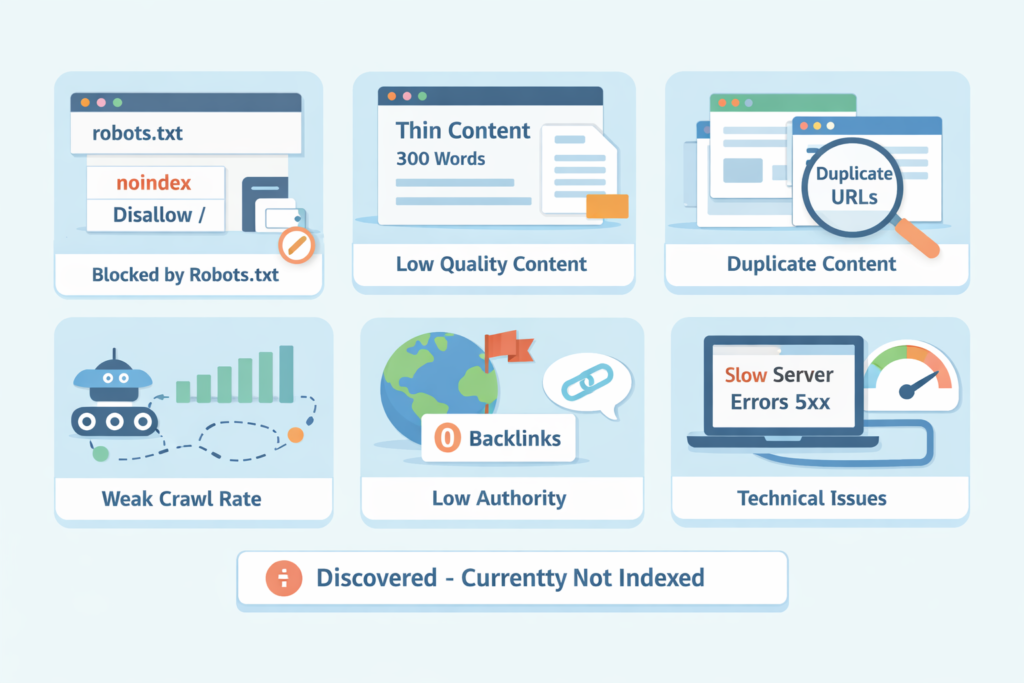
Let’s break this down properly.
Isn’t Submitting a Sitemap Enough for Google to Index My Site?
No. It is not enough.
A sitemap is not a command but a suggestion.
Google uses sitemaps to discover URLs faster. However, indexing depends on quality, crawlability, trust, and technical signals. Therefore, submitting a sitemap does not guarantee indexing.
Think of it this way:
- Sitemap = invitation
- Indexing = approval
Google still decides whether your pages deserve to be indexed.
Moreover, if your site sends mixed signals, Google will simply ignore the URLs in your sitemap.
Is Google Even Crawling My Pages?
Before worrying about indexing, check crawling.
Go to:
Search Console → Settings → Crawl stats
If Google is barely crawling your site, then that’s your first clue.
In one case, I worked with a SaaS startup that had 400 blog posts. However, Google was crawling only 10–15 URLs per day. Therefore, it took months for new posts to even be discovered.
Why?
Their internal linking was weak. Also, their crawl depth was too high and most articles were 5–6 clicks away from the homepage.
After restructuring navigation and also adding contextual internal links, crawl rate increased 4x within three weeks. Moreover, indexing improved dramatically.
So yes, crawl budget matters. Especially on larger sites.
Could My Pages Be Blocked by Robots.txt or Meta Tags?
This is basic. However, it is surprisingly common.
Check:
- robots.txt
- Meta robots tag
- X-Robots-Tag in HTTP headers
If you see:
noindex
disallow: /
That’s your problem.
Moreover, many staging sites accidentally go live with noindex tags. I have seen this happen more times than I can count.
Case study:
An ecommerce brand migrated platforms. However, the development team forgot to remove the sitewide noindex tag. Therefore, Google dropped 80% of their pages within two weeks.
Revenue dropped 62%.
Once fixed, recovery took nearly three months. Also, some rankings never fully returned.
Therefore, always check technical blockers first.
Is My Content Thin or Low Value?
Now we get into the real issue.
Google does not index everything anymore.
If your page has 300 words, adds no unique information or is similar to 50 other pages online, then Google may crawl it. However, it may choose not to index it.
In Search Console, you’ll see:
“Crawled – currently not indexed”
That usually means:
Google saw your page. It just didn’t think it was worth indexing.
Moreover, AI-generated content farms are experiencing this heavily right now.
Case study:
A client published 120 AI-written articles in two months. All optimized. All submitted via sitemap.
Result?
Only 18 were indexed.
Why?
Content lacked originality. Also, there was no topical authority. Therefore, Google simply ignored most of them.
After rewriting key articles with original research and expert insights, indexing then jumped to 70%.
Quality is not optional anymore.
Does My Site Have Enough Authority?
New domains struggle. That’s normal.
If your site has zero backlinks, no brand searches or no traffic history, then Google will crawl cautiously. Therefore, indexing can be slow.
I worked with a new fintech startup. Their sitemap had 85 pages. However, after two months, only 9 were indexed.
We built:
- 12 high-quality backlinks
- 3 digital PR mentions
- Strong internal linking clusters
Within 45 days, indexed pages jumped to 67.
Authority matters. Moreover, Google needs trust signals before fully indexing a new site.
Is My Internal Linking Weak?
Internal linking is often underestimated.
If a page exists only in your sitemap, then Google may treat it as low priority. However, if that page is linked from multiple relevant articles, it gains importance.
Ask yourself:
- Are important pages linked from the homepage?
- Are blog posts linking to each other contextually?
- Do orphan pages exist?
In one audit, I found 200 orphan pages on a content-heavy site. They were only in the sitemap, therefore, Google crawled them rarely and indexed even fewer.
After building topic clusters and also linking related content properly, indexed URLs increased by 38%.
Internal links = priority signals.
Could Duplicate Content Be Confusing Google?
Duplicate content does not always cause penalties but it absolutely affects indexing.
Common problems:
- HTTP vs HTTPS versions
- WWW vs non-WWW
- URL parameters
- Pagination issues
- Filtered ecommerce pages
If Google sees multiple versions of the same content, then it may choose one canonical. Therefore, the others remain unindexed.
Case study:
An ecommerce site had faceted navigation generating 15,000 parameter-based URLs. Google was wasting crawl budget on duplicates. Meanwhile, key product pages were not indexed.
Solution:
- Proper canonical tags
- Noindex on filter URLs
- Clean internal linking
Index coverage stabilized within two months.
Therefore, duplicate chaos kills indexing efficiency.
Is My Sitemap Actually Correct?
Yes, even the sitemap can be wrong.
Common mistakes:
- Including noindex pages
- Including 404 pages
- Mixing canonical and non-canonical URLs
- Including redirected URLs
Your sitemap should only contain:
- 200 status URLs
- Canonical versions
- Indexable pages
One publishing site had 3,200 URLs in their sitemap. However, 900 of them returned 301 redirects.
Therefore, Google started ignoring the sitemap entirely.
After cleaning it, crawl consistency improved significantly.
A sitemap is a hygiene tool, so, keep it clean.
Is My Site Too Slow or Technically Weak?
Technical performance impacts crawl behavior.
If your server:
- Times out frequently
- Returns 5xx errors
- Is extremely slow
Google will reduce crawl rate. Therefore, indexing slows down.
In one case, a hosting provider had unstable uptime. Crawl stats showed spikes of server errors. As a result, Google paused crawling for days at a time.
After moving to better hosting, crawl rate doubled.
Also, Core Web Vitals don’t directly block indexing. However, severe technical issues absolutely can.
Am I Affected by a Manual Action or Algorithmic Suppression?
Check Search Console → Manual Actions.
If there is a penalty, then it will show there.
However, most indexing issues today are algorithmic, not manual.
If your site has:
- Spammy backlinks
- Scaled low-quality content
- Programmatic SEO pages with no value
Google may silently choose not to index.
I audited a site with 5,000 city landing pages generated from a template. They were technically crawlable. However, only 400 were indexed.
Why?
Every page was nearly identical.
After consolidating into 200 high-quality regional pages, indexing improved and traffic also increased 52%.
More pages do not equal more traffic.
Is My Site New and Just Needs Time?
Sometimes, yes.
However, “just wait” is often lazy advice.
If your site has:
- strong internal linking
- quality content
- no technical blocks
- some backlinks
Then indexing should happen steadily.
If it doesn’t, then something is wrong.
For brand-new domains, expect slower indexing in the first 1–3 months. Moreover, consistency helps. Publishing regularly as well as building authority signals Google that your site is active and worth crawling.
Why Does Search Console Show “Discovered – Currently Not Indexed”?
This status means:
- Google found your page
- It has not crawled it yet
Common reasons:
- Low crawl priority
- Weak internal linking
- Large site with crawl budget constraints
Therefore, focus on internal links and authority building.
On one 10,000-page site, we reduced thin content by 40%. Crawl efficiency improved. Moreover, “Discovered – currently not indexed” pages dropped significantly.
Less junk = better crawl allocation.
What Should I Do Right Now If My Pages Aren’t Indexed?
Here’s a practical checklist.
- Inspect URL in Search Console
- Check robots.txt and meta tags
- Verify canonical tag
- Test page speed and server logs
- Improve internal linking
- Remove thin content
- Build backlinks
- Clean your sitemap
- Request indexing only after fixing issues
Also, do not spam the “Request Indexing” button as it does not override quality signals.
Should I Remove Pages That Are Not Getting Indexed?
Sometimes, yes.
If a page:
- Adds no unique value
- Gets no traffic
- Has no backlinks
- Is not strategically important
Consider consolidating or deleting it.
Google prefers strong, consolidated content over scattered thin pages.
In one content audit of 1,800 blog posts, we removed or merged 600 low-value articles. Therefore, overall crawl efficiency improved and organic traffic increased 34% within four months.
More content is not always better.
Can AI Content Be the Reason My Pages Aren’t Indexed?
Yes, especially if it is generic.
AI is not the problem. However, scaled, low-effort AI content is.
Google looks for:
- Original insights
- Expertise
- Unique data
- Real-world examples
If your content reads like every other article online, then Google may skip indexing it.
Therefore, use AI as a tool, not as a replacement for strategy.
What Is the Real Reason Google Refuses to Index My Site?
In most cases, it comes down to this:
Your site does not give Google a strong enough reason to care.
That reason can be:
- Weak authority
- Thin content
- Poor internal structure
- Technical inefficiencies
- Duplicate clutter
Fix those, and indexing then improves.
Sitemaps help, however, they are only a small part of the system.
Google indexes value.
Not URLs.
If you focus on making your pages genuinely useful, technically clean, and also strategically linked, indexing follows.
And when indexing follows, rankings usually do too.

Leave a Reply